Compass Tool
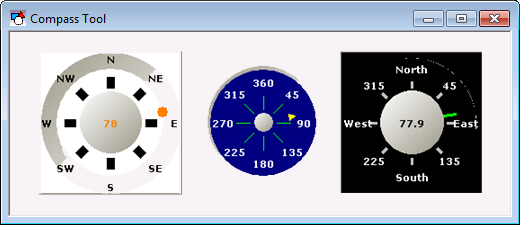
 A Compass Tool object has a pointer that shows a value in relation to 360 degrees. The pointer position is set by the Direction property. In Edit mode, you can assign a default value to this property. If the object is associated with a point, the default value is replaced in Run mode by the actual value of the point. Only use Compass Tool objects with analog points that have a data range of 0 to 360. If the point value is outside of this range, the indicator will wrap and the visual display will not be indicative of the actual value.
|
Compass Tool |
To associate the object with a point use the point identifier properties to form a fully qualified CygNet tag string. The point identifier properties are [1:SiteService], [2:Point ID], [3:Long Point ID], [4:Facility ID], and [5:UDC]. If the object is on a templated screen, only use the [5:UDC] property.
Each caption represents degrees of the circle. By default, the captions are directional indicators (N, NW, E, etc.), but they can be changed to degrees or any other text. The properties that define the caption text are ECaption, NCaption, NECaption, NWCaption, SCaption, *, SWCaption, and WCaption.
The value can be displayed in the indicator hub. This is enabled using the ShowDirectionDisplay property.
A Compass Tool object will always be a circle. That is, its Height and Width properties will always have the same value.
The [AlarmElement] property can be set to show the point state color in the object’s Background Color, the Pointer Color, the Scale Background Color, the Direction Display Color, the Tick Color or not at all (None). When set to None, the color specified for each component is shown. If set to one of the other options, the component color is replaced with the point state color.
The [UseCustomStateColors] property enables the object to use its own custom point state colors. If set to 1 - Yes, the colors used are those defined by the object’s [CustomStateColors] property. If set to 0 - No, the colors are those defined by the TheView’s [CustomStateColors] property.
More:


